
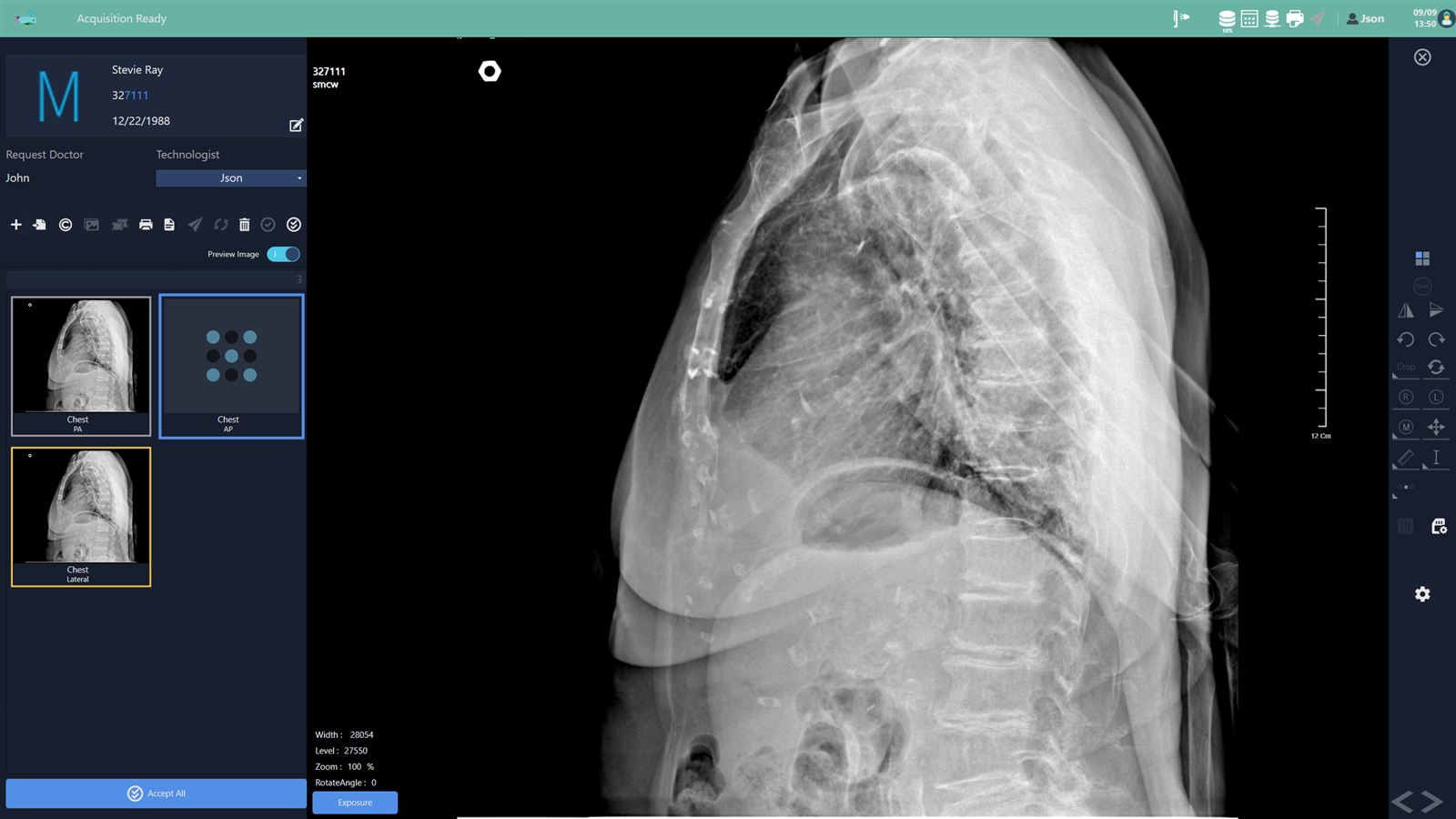
GoDR for the digital X-ray workflow
GoDR is provided as the base product (acquisition and processing). Cloud integration (GoDR Cloud) is in preparation.
AI analysis is not a feature SmartCareworks builds itself; on request, GoDR connects to external AI that is cleared or approved as a medical device.
- Digital X-ray image acquisition and processing software that is not tied to any equipment maker.
- Smart Order Mapping Tool, which automatically picks the acquisition settings for each study type.
- Decision board, which lets you check the image right after acquisition and rotate it freely to the correct orientation.
- Automatic stitching of up to three vertically acquired images into one.
- GoDR Vet is digital X-ray acquisition and processing software for veterinary clinics.
GoDR works with GoWIX Cloud. When an X-ray study is completed, it synchronizes with GoWIX Cloud automatically.
Regulatory status: GoWIX, GoDR and GoStitching are medical devices certified in Korea (MFDS). They are not FDA-cleared and do not carry CE marking. If you need an FDA-cleared product in the United States, please contact our partners: Aspen Imaging Healthcare for GoDR (sold as AspenView, FDA 510(k) K241425) and QPIX Solutions (Osko, Inc.) for GoStitching (sold as Smart Stitching, FDA 510(k) K163048).
Key features
Patient-centred worklist
A worklist designed around studies raises the risk of mixing up patients. GoDR builds the study list around the patient to reduce that risk.
When two patients with the same name are waiting at the same time, change the colour of a patient card to tell them apart.
Automated post-processing
GoDR handles the post-processing a user would otherwise do after each exposure.
Measure the cardiothoracic ratio (CTR) on screen right after acquisition and send it to PACS. Two images are sent automatically: the original and one with the CTR measurement.
Image tools
- Free rotation: turn the image to whatever angle is comfortable for the physician.
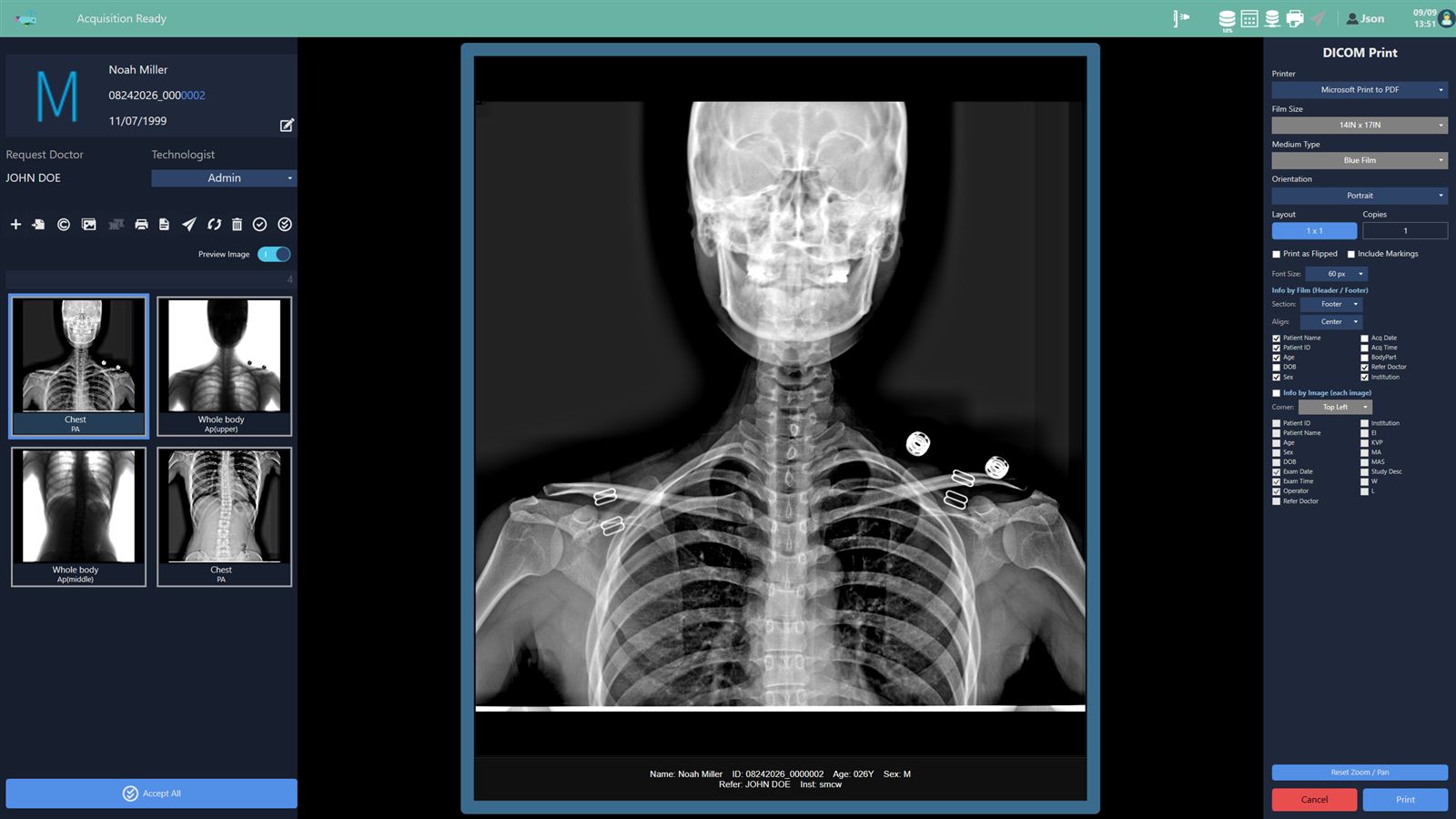
- Film-size cropping: crop to a film size so the image compares with prior images at the same magnification.
- An intuitive screen that new users learn quickly.
GoStitching module
- Acquire single images with about 10% overlap.
- The stitching board aligns the single images automatically. The user checks and confirms the result.
- If patient motion or similar causes a misalignment, align manually with adjustable transparency.
- The confirmed image opens in the study screen for marking, rotation and other post-processing.
SmartOn dashboard
Visualizes information that helps run the hospital, such as study statistics. New items are added over time.
Solved in software
- Runs on Windows 10 or later (Windows 11 recommended).
- Keeps working when existing equipment is upgraded or replaced.
- No additional accessories needed.
- Follows the DICOM 3.0 standard.
Connection
A short, exact set-up.
- X-ray equipmentDetectors and generator
- GoDRAcquisition, post-processing, stitching
- PACSDICOM transfer, automatic sync with GoWIX Cloud
Compatible generators
- POSKOM
- CPI
DICOM compatibility
- DICOM Worklist SCU
- DICOM Storage SCU / SCP
- DICOM Print SCU
- DICOM Echo SCU
Requirements
Hardware
- Processor: Intel Core i5 or higher
- RAM: 8 GB or more
- Display resolution: Full HD (1920 × 1080) or higher
- SSD: 256 GB or more
- SSD/HDD: 256 GB or more for the image folder
- Network: 100 Mbps or faster for DICOM, 1,000 Mbps for the detector link
Operating system
- Windows 10 or later (Windows 11 recommended)
Partners
GoDR is built and supplied together with these detector and equipment companies.
-
 REMEDI
-
 PIXXGEN
-
 FUTURAYTEC
-
 ARO SYSTEMS Australia
-
 ASPEN IMAGING
Compatible detectors
GoDR is not tied to any equipment maker. These detectors are currently confirmed as compatible.
- PIXXGEN
- FUTURAYTEC
- ASPEN IMAGING IODR
-
 H&abyz 1G & 2G Only
-
 iRay
-
 PZMedical
-
 CareRay
-
 DRTECH
-
 Rayence
-
 BonTech
-
 Canon formerly Toshiba
-
 Vieworks
-
 Varex incl. PerkinElmer
-
 LG
-
 RadiSen
- Intra-Oral Imaging
If you need compatibility with a detector that is not on the list, please contact us. We will confirm it with you before you adopt GoDR.